How to Turn a Cooking Video into a Written Recipe
To turn a cooking video into a written recipe, you need two things extracted from it: the full ingredient list with quantities, and the steps in order. You can do it manually with pause-and-type, or let an AI recipe app like Cookit analyze the video link and write the recipe card for you in seconds.
Why cooking from a video doesn't work
Video is a wonderful way to discover food and a terrible way to cook it. Quantities flash by in half a second, steps are edited out of order for pacing, and the "recipe" is often split between voiceover, on-screen text, and a caption. In the kitchen that means greasy fingers on the scrub bar, rewatching the same five seconds to catch whether it was one tablespoon or two.
A written recipe fixes all of that: you can see every ingredient before you start, check quantities at a glance, and follow numbered steps without touching your phone more than necessary.
The manual method (and its cost)
The traditional approach still works: watch the video once for the idea, then again with your Notes app open, pausing to write each ingredient and step. Expect five to fifteen minutes per video, plus detective work when the creator never states an amount. It's fine for the occasional special recipe; it collapses the moment you save three videos a week.
The fastest way: paste the link into Cookit on iPhone
Cookit does the watching and writing for you. It works with cooking videos from TikTok, Instagram, YouTube, and other video links:
- Copy the video's link, or tap Share and choose Cookit in the share sheet.
- Cookit analyzes the video, its audio, on-screen text, and caption.
- It writes a recipe card: ingredients with quantities, numbered steps, prep and cook times, servings, and difficulty.
- Review, edit anything that needs a human touch, and save it to your library.
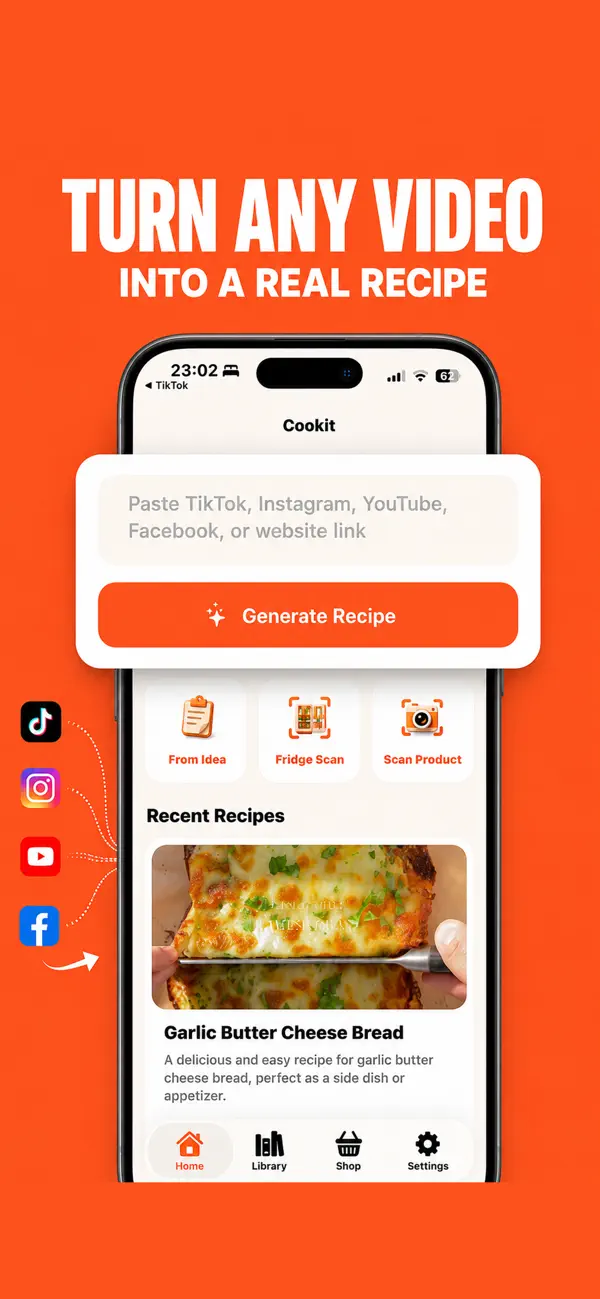
Beyond the basics, each card also includes storage tips, suggested substitutions, and estimated nutrition — details most videos never mention. Once the recipe is written, it behaves like any other recipe in your library: favorite it, edit it, scale servings, and add its ingredients to a shopping list.
Which videos convert best
Not all cooking videos are equally extractable, and knowing the pattern saves frustration. The best candidates state quantities somewhere — spoken aloud, shown as on-screen text, or written in the caption. Standard recipe formats (a stir-fry, a traybake, a soup) convert almost perfectly because the structure is predictable. The trickiest sources are vibes-only videos: no measurements, heavy jump cuts, "a splash of this, a handful of that." Cookit will still produce a coherent card from them, but treat the quantities as a starting point and adjust to taste, the way the creator clearly did.
Length barely matters — a 30-second reel and a 12-minute YouTube video both come out as the same tidy card. That's the quiet superpower of converting video to text: a recipe from a quick-cut TikTok and one from a slow, chatty YouTube tutorial end up equally readable, equally searchable, and equally easy to shop from. Your library flattens every format into the one that works in a kitchen.

Limits worth knowing
AI transcription reflects the source video: if a step is genuinely ambiguous on screen, the written version will be a best interpretation rather than the creator's secret intent, and nutrition numbers are estimates. Cookit is free to download and try; unlimited video and link imports plus AI recipe cleanup are part of the Cookit Pro subscription.
The habit that pays off: convert the video when you save it, not when you plan to cook it. A written recipe read on Sunday tells you instantly whether Tuesday-you can actually make it — and if the creator ever deletes the video, your recipe card doesn't care. The inspiration was theirs; the recipe is now yours.