
How to Make a Grocery List from Your Recipes Automatically
To make a grocery list from your recipes automatically, keep the recipes in an app that stores ingredients as structured data, pick the meals you plan to cook, and let the app combine their ingredients into one shopping list. In Cookit that whole flow is a couple of taps: choose recipes, get the list, go shop.
Why grocery lists usually fail
The manual version is a Sunday ritual everyone recognizes: three recipes open in three tabs, a notes app, and ten minutes of copying ingredients while trying to remember whether two recipes both wanted onions. Miss one line and you're back at the store on Tuesday. It's tedious enough that most people skip it, improvise at the store, and end up with four kinds of pasta and nothing for Thursday.
The failure isn't discipline — it's that recipes stored as videos, screenshots, and bookmarks can't be added up. A recipe has to exist as an ingredient list before any app can turn it into a shopping list.
What a good recipe-to-list workflow looks like
- Pick, don't copy. You select recipes; the ingredients transfer themselves.
- One combined list for the whole week, not one list per recipe.
- Editable at the store. Check items off as you shop, and drop what you already have at home.
- Connected to the recipes. When plans change and you swap a meal, the list should change with it.
The fastest way: build the list in Cookit on iPhone
Because every recipe in Cookit is a structured card — whether it came from a TikTok video, a screenshot, or your own typing — the shopping list builds itself:
- Save the recipes you want to cook this week into your Cookit library.
- Pick the ones you're actually making — three dinners and a batch of overnight oats, say.
- Cookit builds a shopping list from their combined ingredients.
- Skim the list, remove pantry staples you already own, and check items off as you shop.
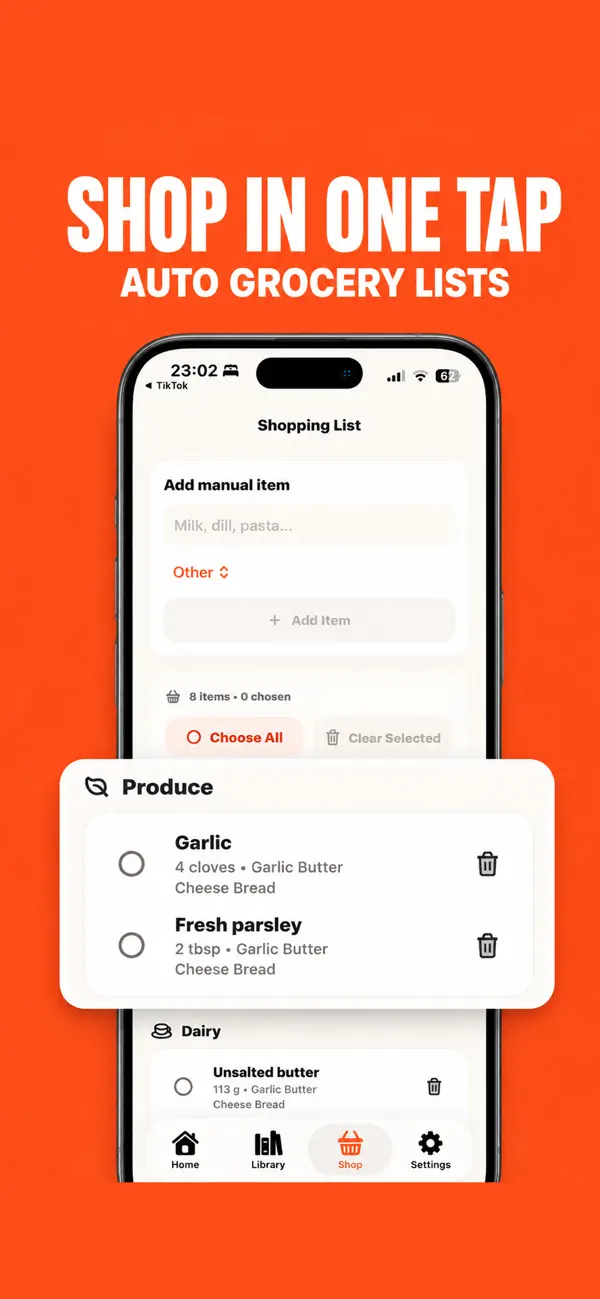
The list stays attached to your recipe library, so "what do I need to buy" and "what am I cooking" are finally the same question. Add a newly saved recipe to the week and its ingredients join the list in one tap.
Make it a ten-minute weekly ritual
The workflow gets dramatically more valuable when it becomes a routine. A version that works for most households: once a week, scroll your Cookit library for five minutes — the new TikTok saves, the old favorites — and pick the week's meals. Let the app build the list, do the pantry pass, shop once. That's the entire administrative overhead of a planned week of cooking, and it's shorter than deciding what to order.
The knock-on effects are the point. Meals repeat less, because picking from a library surfaces recipes you forgot you loved. Impulse saves finally get cooked, because saving a Reel on Tuesday and seeing it in the week's lineup on Sunday closes the loop that bookmarks never close. Food waste drops, because you bought ingredients for specific meals instead of optimistic produce. And the 6pm "what's for dinner" question is answered by a list you wrote when you were calm, fed, and browsing recipes for fun.

Good to know
A shopping list is only as accurate as the recipe cards behind it, so give freshly imported recipes a quick quantity check before a big shop. Cookit is free to download; smart shopping list support, along with unlimited imports and AI Chef, is part of the Cookit Pro subscription.
Start small if the whole ritual feels like a lot: pick just two dinners this week, let Cookit list them, and shop that list. Most people find the third week is when it stops being a system and starts being how groceries simply happen.