
What a General AI Scanner Can and Can't Identify
A general AI scanner like Scale AI can tell you what a plant most likely is — with a confidence level and basic care notes — and that is genuinely useful for an unlabeled houseplant or a tree you passed on a walk. What it cannot do is work out why a plant is sick or give you a treatment plan. Knowing which of those two jobs you actually have will save you a lot of time.
Maybe it's the unlabeled houseplant you inherited with the apartment, a volunteer seedling that appeared in a garden bed, a striking tree on a walk, or the classic worry: "is the thing my cat just chewed toxic?" Naming the plant is the gateway to everything else — how to water it, whether it wants sun, and whether it belongs in your house at all.
Photograph the features that matter
Botanists identify plants by specific traits, and AI models look at the same things. The better your photo captures them, the better the ID:
- Leaves: shape, edge (smooth, toothed, lobed), and how they attach to the stem — alternating or in pairs. One close-up in focus beats five blurry wide shots.
- Flowers or fruit: the most distinctive feature a plant has. If it's blooming, make the flower the star of the photo.
- Bark and overall shape: for trees and shrubs, a bark close-up plus a whole-plant shot narrows things dramatically.
- Context: a potted succulent and a garden weed get identified from different suspect lists, so include enough background to show the setting.
Avoid the common failure modes: harsh backlight, photos taken from two meters away, and frames crowded with three different plants at once. One plant, one photo, close and sharp.
Scan it with Scale AI's Identify Plant mode
- Open Scale AI, tap the mode selector, and choose Identify Plant.
- Fill the frame with the plant's most distinctive feature — a leaf close-up, or the flower if it has one.
- Tap Capture, or import a photo from your gallery (that walk photo from last weekend works fine).
- Read the result: the likely species, a confidence level, and care notes — light, watering, and general keeping tips.
- If confidence is low, rescan with a different feature: a flower shot often resolves what a leaf shot couldn't.
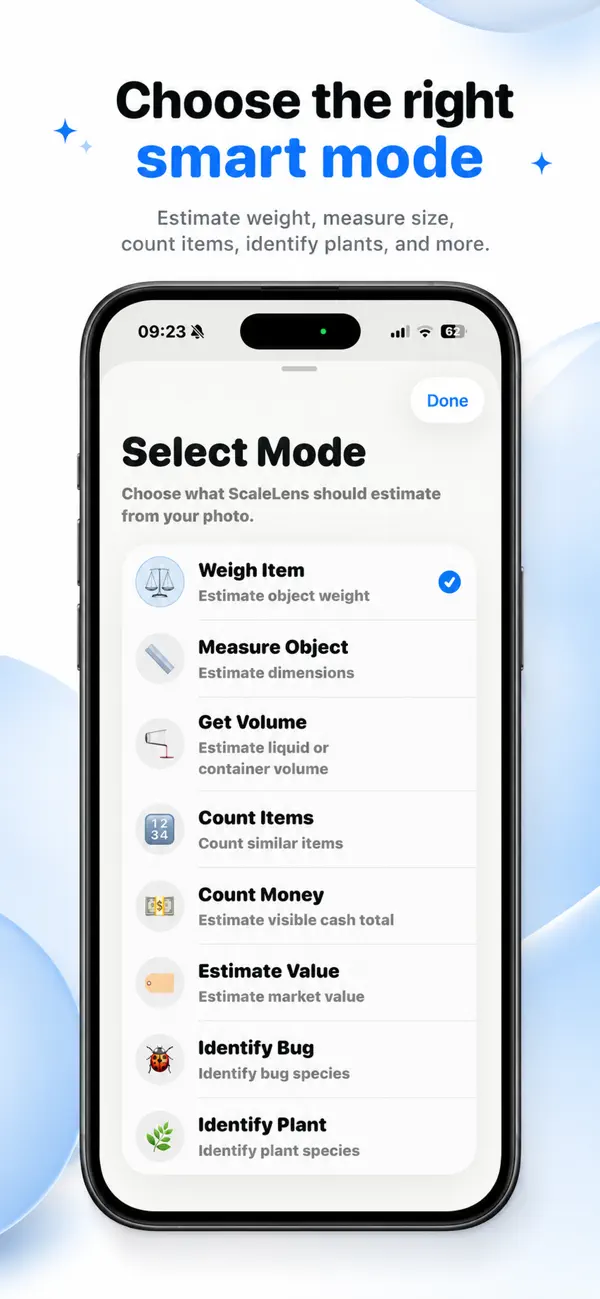
The care notes are the practical payoff: instead of just a Latin name, you get a starting point for actually keeping the plant alive. Scans save to your local history, so your plant collection gradually becomes a labeled catalog — no account needed.
When you need a specialist app instead
Identification and diagnosis are different problems, and it is worth being clear about which one Scale AI solves. Scale AI is a general-purpose scanner: it names things across a very wide range of subjects — plants, insects, objects, weights, quantities. That breadth is the whole point of it, and it is also the limit. It will tell you a plant is most likely a Monstera deliciosa. It will not work out that the yellowing lower leaves are overwatering rather than a nitrogen problem, and it will not track whether the plant recovered after you changed something.
So: if your question is “what is this?”, a general scanner is the right tool and this guide is for you. If your question is “why does it look like that, and what do I do about it?”, you want Botanica instead — a dedicated plant care app that diagnoses plant health from a photo, gives a step-by-step cure plan, and tracks recovery over time.
Treat every photo ID as a strong hint
Visual plant identification is probabilistic — many species have near-identical look-alikes, which is why Scale AI attaches a confidence level and caution notes to every result. That honesty matters most for safety: never eat a foraged plant, treat a rash, or judge toxicity to children or pets based on a photo ID alone. For anything you plan to eat or that may have been eaten, confirm with a qualified expert, and contact poison control immediately if someone has ingested an unknown plant.
